Last updated: August 20, 2026
“Big button phone” sounds like a single product, and it is really a set of design decisions that happen to travel together. Larger keys, more space between them, high contrast printing, a bigger display, a louder ringer, and usually a row of one touch memory buttons. Any one of those alone rarely fixes the problem. Together they turn a phone back into something that can be used without concentrating.
This guide covers what separates a genuinely usable big button phone from one that simply has slightly larger digits printed on a standard keypad, and which format suits which household.
This article contains affiliate links. If you buy through them, we may earn a commission at no extra cost to you. Learn more.
Quick Answer
What makes a big button phone actually easier to use?
- Physically raised, well separated keys with high contrast printing, not just larger numbers on a flat keypad.
- An extra large backlit display, an adjustable and genuinely loud ringer, and a visual ring flasher if the phone sits in a quiet room.
- One touch memory or photo dial buttons, which remove reading and remembering from the most frequent calls.
Bottom line: check key separation, display size, and ringer volume before brand, and add photo dial if numbers are becoming hard to remember.
What Counts as a Big Button Phone
There is no official standard, so the label is applied loosely. In practice the phones worth considering share three things: keys large enough to press confidently with one finger, enough space between keys that a neighbouring one is not hit by accident, and dark numbers on a pale key rather than the reverse.
Photographs in listings can be misleading, since a handset shot in isolation gives no sense of scale. The specification section usually gives handset dimensions, and comparing those against a phone already in the house is a more reliable check than the picture.
Key Separation Matters More Than Key Size
A large key surrounded by other large keys with no gap between them is easier to see and no easier to hit. Look at product photos specifically for the space between keys, since that is what stops a shaky press from dialling two digits at once.
Big Button Phones by Situation
A Fixed Phone That Always Works
A corded big button phone with an extra large backlit display is the most dependable version. Nothing to charge, nothing to pair, and on a traditional copper line it keeps working through a power cut. This is the right phone for a hall table or a bedside.

Carrying the Handset Around
Cordless big button sets bring the same key layout to a handset that travels between rooms. Backlighting matters more here, because the handset is used in more places and more lighting conditions than a phone fixed to one spot.

Dialling by Photograph
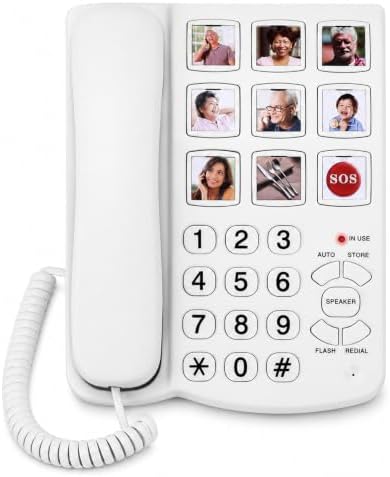
Photo memory phones replace speed dial numbers with picture buttons. Slot in a photograph of each person, program the number once, and calling becomes a single press. For anyone who finds remembering numbers harder than it was, this is the feature that matters most.
When the Ringer Is the Real Problem
If calls are being missed rather than misdialled, the fix is a phone with a high ringer setting, a selectable ring tone, and ideally a bright visual flasher on the base. Listings state ringer volume in decibels, and models built around amplification usually state it prominently.

Big Buttons Away From Home
The same design ideas exist in mobile form, mainly as flip phones with physical keys and a simple menu. That route has its own considerations around plans and coverage, covered in our cell phone and smartphone guide.
Comparing the Formats
| Format | Strength | Trade off |
|---|---|---|
| Corded big button | Always powered, nothing to charge | Fixed to one location |
| Cordless big button | Goes to the chair or the bedroom | Base needs mains power |
| Photo memory | One press calling, no numbers involved | Limited number of picture keys |
| Amplified model | Louder handset and ringer, stated in decibels | Volume settings need setting once, properly |
| Big button mobile | Works outside the house | Requires a mobile plan and charging |
Features Worth Paying Attention To
Beyond the keypad, three things separate a good big button phone from an average one: a display large enough to read at arm’s length, a speakerphone that is clear rather than merely loud, and memory buttons that can be programmed without a manual. All three appear in the specification list.
A caller identification display is also worth having, since a readable name on an incoming call helps with the constant stream of nuisance calls that landlines attract. Some models add a call block button on the handset for exactly that reason.
Hearing Aid Compatibility
Manufacturers publish a hearing aid compatibility rating for handsets, and it appears in the specifications rather than the marketing text. Whether a particular rating suits a particular hearing aid is a question for the audiologist who fitted it, not something to work out from a product page.
Common Mistakes When Buying
The first is judging size from a photograph. Listings are shot to flatter, and a handset that looks generous on screen can be ordinary in the hand. Compare the stated dimensions against a phone already in the house instead.
The second is buying a big button phone when the actual difficulty is hearing the call rather than dialling it. Those are different problems with different solutions, and a phone with large keys and a quiet ringer solves neither.
Leaving It Unprogrammed
Memory and photo buttons only help if they are filled in. Program them together with the person, put the photographs in while you are there, and write the assignments on a card kept near the phone in case a button is ever reprogrammed later.
Frequently Asked Questions
What is the best big button phone for the elderly? For a fixed location, a corded model with an extra large backlit display, well separated keys, and an adjustable loud ringer. Add photo dial buttons if remembering numbers has become the harder part.
Are big button phones available as cordless sets? Yes, and many come as a base with expansion handsets so the same layout is available in several rooms. Backlit keypads matter more on cordless handsets than on corded phones.
What is a photo dial phone? A phone with picture buttons, each holding a photograph and a stored number. Pressing the photograph places the call, which removes both reading and remembering from the process.
How loud can these phones ring? Ringer volume is stated in decibels on most listings, and amplified models publish it prominently. If calls are still missed, look for a model with a visual ring flasher as well as a loud ringer.
Do big button phones work with hearing aids? Manufacturers publish a hearing aid compatibility rating in the specifications. Whether it suits a specific hearing aid is best confirmed with the audiologist who fitted it.
Is there a big button mobile phone? Yes, mostly flip phones with physical keys and a simplified menu. They need a mobile plan, and the options are compared in our cell phone guide.
Can these phones block nuisance calls? Many include a call block button and a blocked number list, and caller identification on a large display helps decide before answering. Check the stated capacity of the block list if nuisance calls are frequent.
How many memory buttons is enough? Most people use three to six regularly. More buttons than that tend to go unfilled, so a phone with a small number of large, well labelled keys usually beats one with a long row of small ones.
The Bottom Line
A big button phone earns its place through key separation, display legibility, and ringer volume, not through the size of the digits alone. Decide first whether the difficulty is dialling, reading, or hearing the call, because each points at a different feature. Photo dial buttons are the single most underrated option here. For the wider comparison between corded, cordless, and mobile, start from our phones for seniors overview.