Last updated: August 20, 2026
A smart speaker is one of the few pieces of technology that gets easier with age rather than harder, because the interface is a sentence. There is nothing to read, nothing to press, and nothing to find. Ask what day it is, ask it to call your daughter, ask it to remind you at six.
The catch is that almost none of that works well out of the box. An Echo unpacked and plugged in is a music player that occasionally mishears. The value comes from an hour of setup, most of which is done in the app on someone else’s phone, and this guide walks through exactly what to configure and in what order.
This article contains affiliate links. If you buy through them, we may earn a commission at no extra cost to you. Learn more.
Quick Answer
How do you set up Alexa for an older parent?
- Choose a device with a screen if video calls matter, or a plain speaker if it is for reminders and questions.
- Set up the account, add family members to the contact list, and create the recurring reminders together so the wording is theirs.
- Then add routines for the things that repeat daily, and decide as a household how the drop in and announcement features will be used.
Bottom line: the device is cheap and the setup is the product. Budget an hour, do it together, and write the useful phrases on a card left beside the speaker.
Which Echo Device to Choose
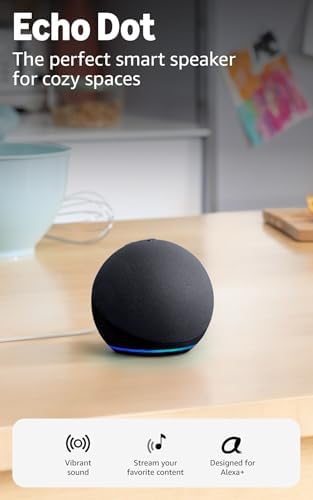
Two questions decide it. Will video calls happen, and does the person want to see anything on a screen. If yes to either, a display model earns its place. If the use is reminders, questions, radio, and voice calls, a plain speaker does the same job for less and takes up less space.
Screen models have a second advantage that matters more than the video calling: the display shows the time, the day, and any reminders sitting in the queue, which turns the device into a calendar as well as an assistant.
A Display for the Living Room or Kitchen
A mid sized smart display sits well on a kitchen counter or a side table, shows the day and upcoming reminders on screen, and handles video calls with family without anyone opening an application. This is the version most families end up choosing.

A Plain Speaker for a Bedroom or Second Room
A small speaker in a second room extends voice control through the house and can be used for announcements between rooms. It is the sensible addition once the first device has proven itself rather than the place to start.
Setting It Up in the Right Order
Do the account, contacts, and reminders before showing anyone the device. A first demonstration that works builds confidence, and a first demonstration where nothing is configured yet does the opposite. All of this happens in the Alexa app on your own phone.
Connect it to the home wifi, sign in with an account that belongs to the household rather than to you, and set the device location so local information is correct.
Adding the People Who Matter
Import or add the family contacts in the app, and check how each name will be spoken. Calling by first name works best, and two people with similar names in the contact list is the single most common cause of the wrong call being placed.
Reminders That Actually Get Used
Reminders are the most valuable feature here and the one most often left unconfigured. In the app, add each recurring reminder with the exact wording the person would use themselves, set it to repeat on the right days, and let the device announce it out loud rather than only showing it on screen.
Good candidates are tied to a time rather than a task: a weekly one for the bin collection, or a standing appointment. Keep the total small, because a device that talks constantly gets unplugged.
Reminders Are Not a Medication System
A spoken reminder is a prompt, not a record. It cannot confirm anything happened and it does not survive a power cut or a wifi outage. If the timing of doses is the actual problem, a dedicated device is the better tool, and our guide to automatic pill dispensers covers those. Anything about the medication itself belongs with the pharmacist or the prescribing doctor.
Routines: Several Things From One Sentence
A routine chains actions to a single phrase or a set time. Saying good morning can read out the day, the weather, and the first reminder in one go. A routine at dusk can switch on a lamp through a smart plug without anyone crossing a dark room to reach a switch.
Build no more than three or four at first, name them with phrases that are natural to say, and write those phrases on a card left beside the speaker. Routines that nobody can remember the trigger for may as well not exist.
Lamps and Smart Plugs
A smart plug is the cheapest useful addition to a speaker, because it brings an ordinary lamp under voice control without any wiring. Pair one with a bedside lamp and a routine, and getting up at night stops involving a wall switch across the room.

Calling, Drop In, and Announcements
| Feature | What it does | Worth knowing |
|---|---|---|
| Voice calling | Calls another Echo or the Alexa app on a phone | Hands free, no phone needed at their end |
| Video calling | Same on a screen device | The main reason to choose a display model |
| Drop In | Connects to a permitted device without being answered | Needs explicit agreement; enable per contact |
| Announcements | Broadcasts a spoken message to devices in the house | Useful between rooms in a shared home |
| Do not disturb | Silences calls and announcements on a schedule | Set it for night hours during setup |
Drop In Deserves a Conversation
Drop In opens an audio, and on screen devices a video, connection to the other end without anyone answering. In a household where both sides have agreed to it, that is genuinely useful. Enabled quietly by an adult child, it is a microphone in someone’s living room that they did not consent to.
Enable it for named contacts only, explain how the chime and the on screen indicator show when a connection is open, and show the person how to switch it off. A feature that has been explained tends to stay switched on, while one discovered by accident gets the whole device unplugged.
Privacy Settings Worth Reviewing
Go through the privacy section of the app together, decide whether voice recordings are kept, and set them to delete automatically if that is preferred. Do not disturb hours belong in the same conversation, since a device that announces at midnight gets muted permanently.
Where a Smart Speaker Does Not Help
It is not an alert device. It depends on power and wifi, it cannot reach anyone if the internet is down, and it should never be described as a substitute for a call button or an alert system. For that job, look at caregiver pagers and call buttons, which work on their own radio link with no internet involved.
It also does not replace a phone. Voice calls through a speaker are convenient at home and unavailable everywhere else, so the household still needs the arrangement covered in our phones for seniors guide.
Frequently Asked Questions
Is Alexa good for seniors? It suits people who prefer speaking to reading a screen, and it is strongest for reminders, questions, radio, and hands free calls. The value depends almost entirely on whether someone configures the reminders, contacts, and routines properly at the start.
Which Echo device should we buy? A screen model if video calls or an on screen day and reminder view matter, a plain speaker if it is for voice only. Many households start with one display in the main room and add a small speaker later.
Can Alexa remind someone to take medication? It can speak a reminder at a set time, which is a prompt and nothing more. It cannot confirm anything was taken and it stops working in a power or internet outage. A dedicated pill dispenser is the better tool for that job.
What is Drop In and should we turn it on? It connects to a permitted device without the other end answering. Turn it on only for named contacts, only with the person’s agreement, and show them the indicators and the off switch.
Does Alexa work without the internet? No. Voice commands are processed online, so a broadband or power outage stops everything, including reminders. That is the main reason it cannot serve as an alert system.
Can Alexa call the family hands free? Yes, to other Echo devices and to the Alexa app on family phones. Getting the contact names right during setup is what makes this reliable in practice.
Is it listening all the time? The device listens locally for the wake word and sends audio after it hears it. The privacy section of the app shows what is stored and lets recordings be deleted automatically, which is worth setting up together.
What if the person finds voice commands frustrating? Reduce it to three phrases written on a card, drop the rest, and see whether those three stick. If speaking to a device does not suit them, a day clock and a written list often do the same job with less friction.
The Bottom Line
A smart speaker is worth having for an older adult when someone puts an hour into the setup: contacts named clearly, a small number of spoken reminders, three or four routines with memorable phrases, and Drop In configured openly rather than quietly. Choose a display model if video calls matter, add a smart plug for a bedside lamp, and keep the expectations honest, since nothing here works without power and wifi. Pair it with a call button for the jobs a speaker cannot do.