Last updated: August 20, 2026
Long before anyone considers a monitored alert service, most households need something much smaller: a way for one person to say “come here” from the back bedroom without shouting. That is a caregiver pager, and it is one of the least expensive changes you can make to a house where two people are living around each other’s needs.
The category is confusing mainly because the search term “call button for elderly” pulls up monitored medical alert plans alongside a simple wireless doorbell set. This guide separates the two, and covers what to look for in a pager set that works entirely inside the house with no monthly fee attached.
This article contains affiliate links. If you buy through them, we may earn a commission at no extra cost to you. Learn more.
Quick Answer
What is the best caregiver pager for a home with no monthly fee?
- A wireless call button paired with one or two plug in receivers covers most homes. The button goes where the person is, the receiver goes where the caregiver is.
- Look for adjustable volume, a visible flashing light, and enough range to cover the whole house including one floor up.
- These are one time purchases and work without wifi, a phone, or a plan. Monitored services that call an operator are a different product entirely.
Bottom line: buy for range and volume, add a second receiver rather than hoping one is loud enough, and keep the button within arm’s reach of where it is needed.
How a Caregiver Pager Works
A caregiver pager is a small radio pair. Pressing the button sends a signal on its own frequency to a receiver plugged into a wall socket, which then chimes and flashes. There is no internet, no phone, no account, and no call center involved. It works during a power cut if the receiver has a battery, and it works if the wifi is down.
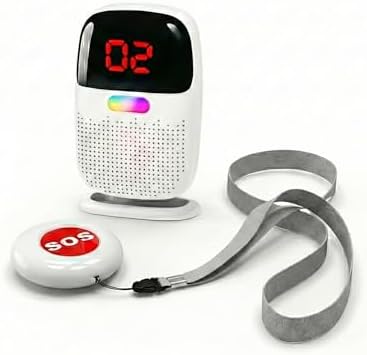
Most sets ship as one button and one receiver, with the option to add more of either. Extra buttons let you cover the bedroom and the bathroom, and extra receivers let you cover the kitchen and the upstairs landing so the chime is audible wherever you happen to be.
Why It Is Not a Medical Alert Service
A pager reaches someone in the same house. A monitored medical alert service reaches an operator anywhere, which is why it carries a monthly charge. If the person is regularly alone in the house, the pager is not the right tool, and our guide to medical alert devices without a monthly fee covers the middle ground.
Call Buttons and Pagers by Situation
The Standard Home Setup
One waterproof call button and one plug in receiver, expandable later. CallToU and similar brands dominate this space with sets that pair out of the box and offer a choice of ring tones. This is the configuration most families start with and most stay with.

A House Where One Receiver Is Not Enough
If the caregiver moves between a kitchen, a workshop, and an upstairs bedroom, one receiver will be missed. Sets sold with two or three receivers solve this properly, since every receiver sounds at once rather than handing off between them.

Keeping the Button Where It Is Needed
Buttons that come with both a wall mount and a wrist or lanyard option are more useful than either alone. The wall mount goes beside the bed or in the bathroom, and the portable one stays with the person, so there is no single spot the whole system depends on.

Carrying the Receiver Around the House
A pocket sized receiver with a rechargeable battery suits caregivers who are rarely in one room. Look for a vibration option as well as a chime, which is what makes it usable while vacuuming or while someone else is asleep.
Adding a Door Chime to the Same System
Some ranges let a door or window sensor share the receiver with the call button, using a different tone so you can tell them apart. That is useful if the front door is a concern as well, and it avoids a second set of gadgets on the counter.

Comparing the Features That Matter
| Feature | What to look for |
|---|---|
| Range | Listed range is open air; expect noticeably less through floors and walls |
| Receivers | Buy the number of rooms you actually occupy, not one |
| Volume | Multiple levels, with a genuinely quiet setting for night use |
| Light alert | A flashing LED matters if the chime may not be heard |
| Power | Plug in receivers with battery backup keep working in an outage |
| Expandability | Stated maximum number of paired buttons and receivers |
Where to Put the Button
Put a button within arm’s reach of the two places people most often need help and cannot easily move: the bed and the bathroom. A button on a hallway wall looks tidy and gets used far less, because the moments it exists for are exactly the moments walking to the hallway is not an option.
Bathroom buttons should be rated for splashes, and the listing will say so. Mount it low enough to reach from a seated position rather than at light switch height, and check that reach from the actual seat rather than from standing.
Testing It Properly
Walk the house with the button and press it from every room, including the bathroom with the door closed and the far end of the garden if that is where you go. Signal drops through tiled walls and between floors more than the box suggests, and a five minute walk around tells you whether you need a second receiver.
Common Mistakes
The most common is one receiver in a house with three floors, which turns a reliable system into an unreliable one and quietly erodes trust in it. The second is a button left on a bedside table where it cannot be reached from the floor or from the far side of the room.
The third is buying a monitored plan when the need was simply “I want to call my husband from the back bedroom.” Work out first whether the person is ever alone in the house, because that single question decides which product category you are actually shopping in.
A Note on Expectations
A pager is a communication tool, not a safety system. It works when the person is conscious, able to press, and within range of a receiver that someone is near. Those are reasonable conditions in a shared household and unreasonable ones for someone who spends days alone.
If you are unsure what fits your situation, ask your doctor or an occupational therapist. They will usually ask about the layout of the house and how much time the person spends alone before recommending anything at all.
Frequently Asked Questions
What is a caregiver pager? A wireless call button and receiver pair used inside one home. The person presses the button, a receiver in another room chimes and flashes, and no phone line, wifi, or subscription is involved.
Is there a call button for the elderly with no monthly fee? Yes, and it is the norm in this category. Wireless caregiver pagers are one time purchases. The monthly fees you see advertised belong to monitored medical alert services, which do a different job.
How far do caregiver pagers actually reach? Listings quote an open air range that is optimistic indoors. Through two floors and several walls, expect a fraction of it. Test from the furthest point you care about before deciding one receiver is enough.
Do caregiver pagers need wifi? No. They use their own radio link between button and receiver, so an internet outage does not affect them. This is one of the main practical advantages over app based alternatives.
Can I use a call button in the bathroom? Yes, if the button is rated for water exposure, which the product listing will state. Mount it within reach from a seated position rather than at standing height.
How many buttons and receivers can be paired? Most ranges support several of each and state the maximum on the listing. Sticking to one brand family keeps pairing simple when you expand later.
What happens during a power cut? Plug in receivers stop unless they include a battery backup. Buttons run on their own cell battery and keep working. If outages are common where you live, check for a backup battery explicitly.
Is a caregiver pager enough if my parent lives alone? Not on its own, since the alert only reaches someone in the house. For someone alone, look at the options in our guide to medical alert devices without monthly fees and discuss the situation with their doctor.
The Bottom Line
A wireless caregiver pager is one of the cheapest changes that meaningfully reduces the daily friction of caring for someone in the same house. Buy for range and buy enough receivers, keep a button beside the bed and another in the bathroom, and test it by walking the house rather than trusting the number on the box. If the person spends long stretches alone, the pager is a companion to, not a replacement for, the options in our no monthly fee alert guide.